Home/Blog/EPOS for restaurant use: what a UK restaurant needs from its POS
EPOS for restaurant use: what a UK restaurant needs from its POS
One system, four jobs: the counter, the tables, the kitchen and the online orders, with no commission on any of them. What a UK restaurant should ask of its EPOS, in UK terms, and what it should cost.
Tanzeel ur Rehman · Co-founder, Get Menu · 7 October 2026 · updated 16 October 2026
EPOS for restaurant use in the UK means one system doing four jobs: the counter, the tables, the kitchen and the online orders, without a commission on any of them. GetMenu's EPOS runs on an iPad or an Android tablet you already own, records card payments taken on your own card machine, and puts every order on one screen.
The four jobs an EPOS for restaurant use has to do
An EPOS earns its place by doing four jobs without a second system or a second login. It takes the sale at the counter and records how it was paid. It runs the tables, from the floor plan to the split bill. It tells the kitchen what to cook, in order, without a shout. And it takes the online orders that are now a large part of the week.
GetMenu's counter app runs on an iPad, an iPhone or an Android tablet. It pairs with a six-character code from your dashboard, and each staff member gets a four-digit PIN. Card payments go through the card machine your own bank or card provider already gave you, and the sale records cash or card.
Most receipt printers work, including ESC/POS and Star models. Receipts and kitchen tickets print on USB (on the LAN), network, Bluetooth and built-in printers, and the cash drawer opens through the receipt printer. Kitchen tickets print for each station from the POS.
A shift opens with the cash you start with and closes with a count of the notes and coins. GetMenu then makes an end-of-day Z report. It goes to your managers' WhatsApp group and to the owner's email, with the card machine's total beside the counter's card total.
The same app works for a cafe counter, for a takeaway with a queue, and as one of the epos systems for bars, where each table or bar seat has its own tab. Collection orders show on the same screen until the customer collects them. Phone orders are typed in at the POS and sent to your riders on WhatsApp.
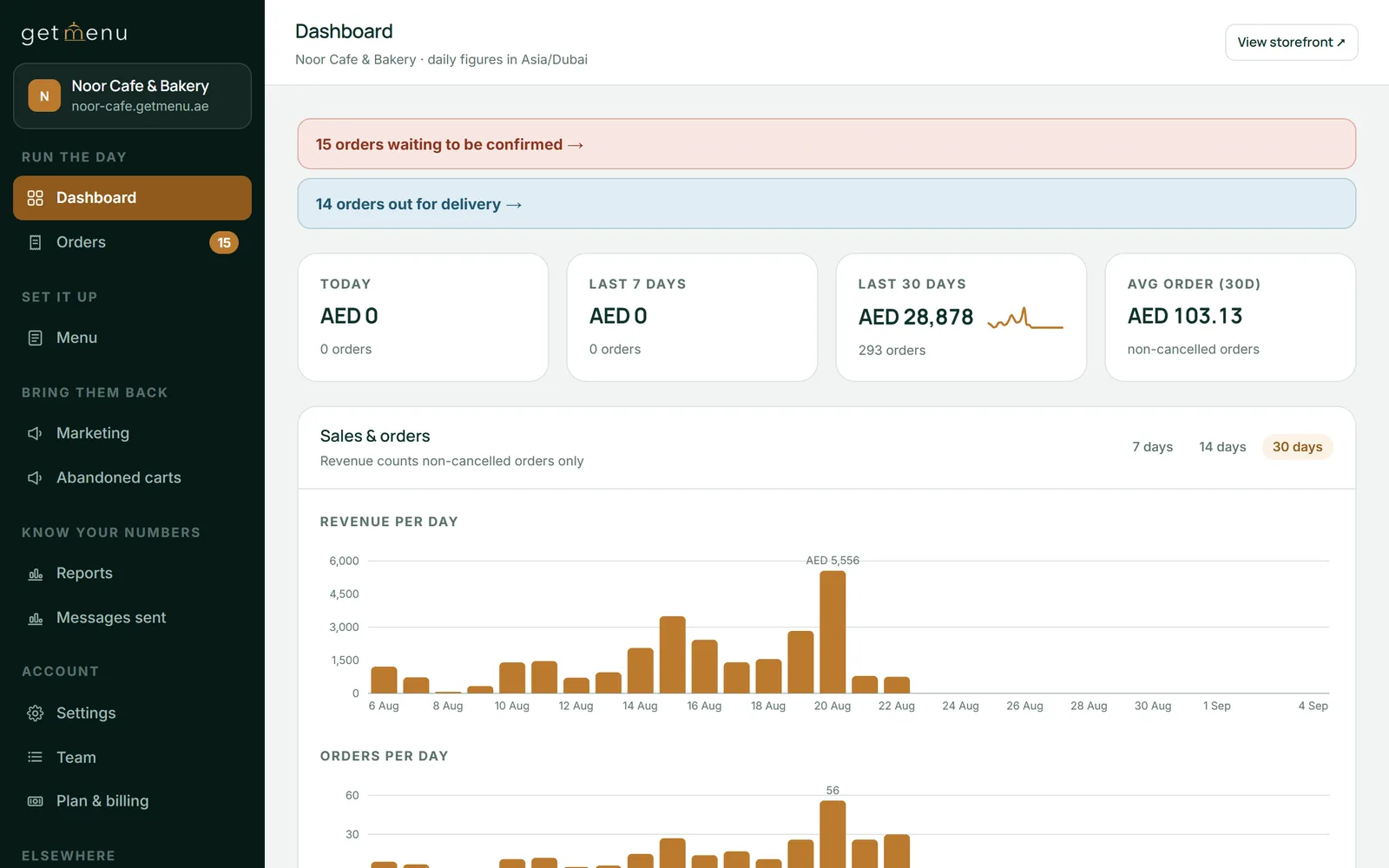
The Noor Cafe & Bakery dashboard: orders waiting to be confirmed, orders out for delivery, and sales for today, the last 7 days and the last 30 days
EPOS for tables and the kitchen
A hospitality epos system has to know which table is which. With the POS add-on you list your tables, draw them on a floor plan by dragging, and every device shows the same room. White is free, dark is an open tab, amber is a table that has asked for the bill.
A guest who scans a table's QR code orders from their phone with no address to type, because the table is the address. The order opens as that table's tab. Table QR ordering is on the Growth and Pro plans. A waiter's phone adds a round to the same tab, and bills split by item or evenly. Bookings taken on your ordering page show on the free table's tile before the party arrives.
Every order lands on one kitchen ticket: counter, table, web and WhatsApp. Tickets print for each station from the POS, or show on the kitchen screen, or both. Orders arrive in order, and each table round is its own ticket. The spice level and the other choices are printed in bold on the kitchen ticket, under the dish. A customer's note prints on the ticket, and an allergy note prints in bold red above the dishes.
There is one stock list for the counter and the online menu. Every sale lowers the count, from the counter, the tables or the ordering page. Mark a dish None left on one device and it comes off every other POS device and off your online menu.
Online ordering with no commission
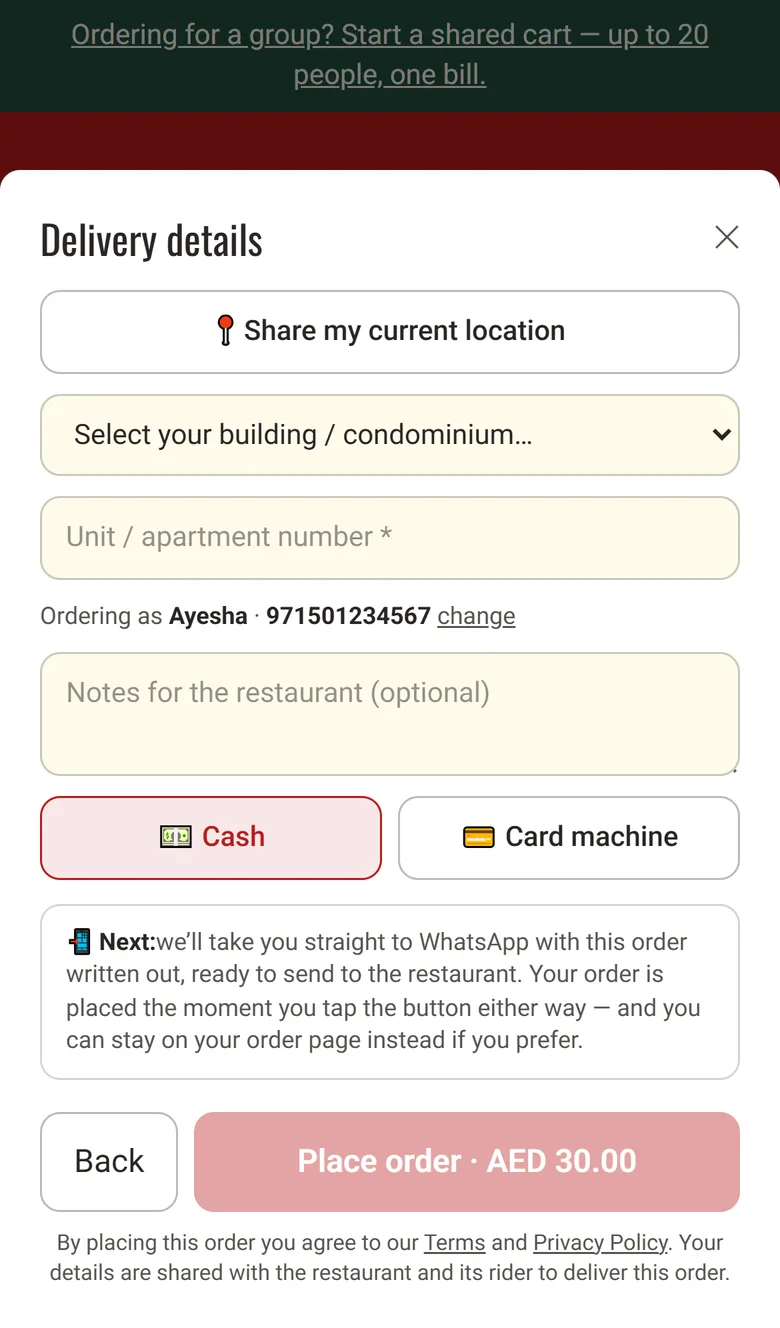
GetMenu gives you your own ordering page in every plan, with no commission on any order. It has your own address, your menu with photos and choices, and a checkout that asks only for a name and WhatsApp number, with no account to create. The customer picks a building or area from your list, types the flat or house number, and can share a map pin.
The moment the order is placed, three WhatsApp messages go from your own number. The customer gets a confirmation, the managers' group gets a ticket, and the riders' group gets a dispatch. The dispatch carries the address, the pin, the phone and whether to collect cash or bring the card machine. From the POS, the cashier picks a rider and sends the order to them on WhatsApp. The rider taps one link to mark it delivered.
Online and WhatsApp orders show on the POS screen beside counter sales. If you want a delivery epos, this is what it should mean: an epos ordering system where the online order sits on the same screen as the counter sale. If you also sell on Deliveroo, its orders land on the same board and kitchen screen once Deliveroo gives you partner access. Prices show in pounds, and invoices come in pounds with your business details on them.
The delivery details step: a Share my current location button, the building dropdown, the unit number, notes, Cash or Card machine, and the Place order button
What UK restaurant EPOS costs, and what to compare instead of a ranking
Compare on four questions instead of a ranking. Is the ordering page included, and is there a commission on it? What hardware must I buy, or can I use the iPad I have? Is there a per-card fee to the EPOS company on top of my card provider's? And what does the kitchen see?
GetMenu's answers: a flat monthly plan in pounds, with the ordering page included. The plans are on the pricing page. There is no card fee to GetMenu, because it takes no card payments itself. The POS is a yearly add-on on top of the plan and has no trial of its own. The plan's trial runs 15 days with no card.
Mobile epos systems and the devices you already own
Mobile epos systems used to mean a rugged handheld from the EPOS supplier. Now it means the phones your staff already carry. GetMenu's epos software for restaurant staff is one app on iPad, iPhone and Android. An Android phone or a spare tablet joins the room when you type a six-character code. A waiter's phone is the handheld, the tablet on the wall is the kitchen screen, and the iPad on the counter is the register. If you are choosing an epos system for cafe use with one counter, that is one tablet and the printer you already have. The same goes for epos for cafes with a few tables.
Behind the counter, the dashboard runs on any browser. Upload the whole menu from a spreadsheet instead of typing it, set stock counts, read the shift reports, and download your orders as a CSV. On Growth and Pro, set coupons with exclusions and expiry dates. On Pro, regulars grow into tiers with their own discounts, and the loyalty card keeps updating itself in Apple Wallet or Google Wallet.
Tanzeel ur Rehman, a co-founder of GetMenu, puts the UK case in one line. "A quote prices the counter. Online orders, the kitchen and delivery come after it."
What a restaurant EPOS does not do
GetMenu does not process card payments or take online payments. The card machine is yours, and customers pay at the door or at the counter. It does not do accounting, payroll or rotas. If you need those, use a separate tool next to GetMenu.
Each restaurant is its own account. GetMenu groups several on request, so one owner login sees their sales side by side, but it is not a full head-office reporting tool.
Frequently asked questions
What is a restaurant EPOS system?
It is the electronic point of sale that takes the sale at the counter. In a restaurant, it also runs the tables, tells the kitchen what to cook and takes the online orders. EPOS is the term used in the UK and Ireland and POS the one used almost everywhere else; they are the same thing. GetMenu's EPOS does the four jobs in one app on an iPad or Android tablet, with the ordering page included.
How much does a restaurant EPOS system cost in the UK?
One UK cost guide puts hardware at around £300 for a tablet stand and £800 to £1,500 for a professional terminal, with card processing on top, and a round-up lists Lightspeed from £75 a month. GetMenu is a flat monthly plan in pounds with the ordering page included, listed on the pricing page.
What are the best EPOS systems for restaurants?
The rankings name Square, Lightspeed, Epos Now, Clover and Zettle. The best choice depends on what you need beyond the counter. Ask four questions: is the ordering page included, what hardware must you buy, is there a card fee to the EPOS company, and what does the kitchen see?
Does GetMenu take card payments?
Not itself. Customers pay on the card machine your own bank or card provider gave you, at the counter or at the door, or in cash, and the sale records which. GetMenu takes no online payment and charges no card fee, so the only card cost is the one you already pay.
Does an EPOS in the UK need to be Making Tax Digital ready?
The EPOS files nothing itself. Under Making Tax Digital for VAT, the return goes to HMRC from compatible software, usually your accounting package, and figures must move between programs digitally, for example as an exported file rather than numbers typed in again. GetMenu exports the sales and shift reports as CSV, ready for your accountant's software.
Square is a good first POS for a cafe or a food truck. It is time to move when your riders work from WhatsApp, the card bill grows with every sale, a third site opens, or stock must be counted per add-on.
Good hardware with payments built in is both the appeal and the catch. What Clover does well, what the app market and the processor cost you, and why delivery kitchens tend to look elsewhere.