
Switching from Sapaad POS: what moves to a new system
Leaving a POS is mostly paperwork: export the menu, keep the reports, pair the iPads again. Here is what moves from Sapaad, what does not, and what Sapaad still does well.
Home / Blog / Moving from the NCR Aloha restaurant POS to the cloud
The server goes, the menu moves as data, the counter runs on devices you choose, and online orders and riders join the same screen. What changes when a restaurant leaves on-premise Aloha, and how to do it without a lost service.
Anzul Aqeel · Founder & Director, Anunzio International FZC · 7 October 2026 · updated 16 October 2026
Moving from the Aloha restaurant POS to a cloud system changes four things. The server in the back office goes, the menu moves as data, the counter runs on devices you choose, and online orders and riders join the same screen. Aloha itself now sells a cloud version. Here is what changes, and how to move without losing a service.
In 2026 the Aloha name covers two products: Aloha Essentials on a server in the restaurant, and Aloha Cloud on NCR's own service. Aloha has run American dining rooms for many years, and NCR still sells and supports it. After NCR's 2023 split the brand stayed with NCR Voyix, which sells two lines under the Aloha name. Aloha Essentials is the flagship: the Windows-based system that lives on a server in the restaurant, priced to each restaurant by quote, built for table service and chains. Aloha Cloud is the newer line, launched in 2022 as a cloud-based POS under the Aloha brand.
Many restaurants still run an older Aloha install: thousands of full-service locations still run it, often on legacy on-premise servers. So an NCR Aloha POS system in a restaurant today is one of two things: an on-premise install on a server in the building, or Aloha Cloud. This guide is about the first, and the question for its owners is the same whether they move to Aloha Cloud or to something else.
When the server goes, there is nothing to back up and no machine to repair. An on-premise Aloha restaurant system keeps the menu, the sales and the settings on a machine in the back office. That means a backup routine, Windows updates and a technician's visit when it fails. If the server fails and there is no recent backup, the menu and the sales history go with it. A cloud system keeps all of that on the service, and your devices connect to it. The service updates itself, the app tells you when a new version is waiting, and a dead device is replaced by pairing another with a new code.
On GetMenu there is no server. The POS app runs on an iPad, an iPhone or an Android tablet, and it pairs with a six-character code from your dashboard. If the internet drops, the counter keeps selling. Each sale is saved on the device and sent when the connection returns, and the cash drawer still opens. The drawer opens through the receipt printer. Printers can be USB (on the LAN), network, Bluetooth and built-in. Every staff member signs in with a four-digit PIN.
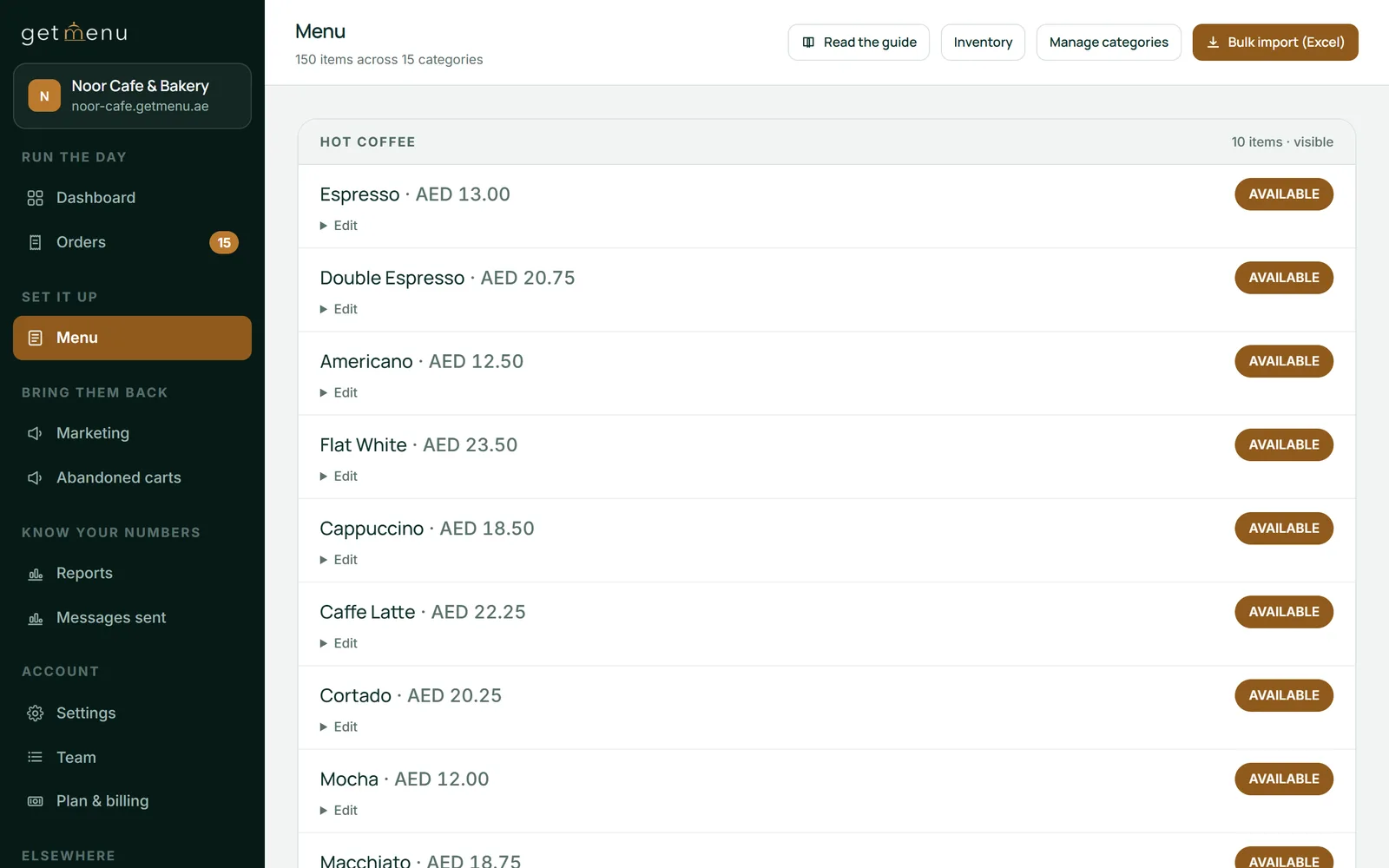
You edit the menu once, in your dashboard. The ordering page shows the change right away, and each POS picks it up when the app opens or when someone taps Look again.
The menu is the part that takes work, and the part people underestimate. One migration playbook for Aloha and Micros restaurants says the time to scope the migration data is in the pilot, not in the planning. It warns that projects lose 5 to 12% of their modifier detail unless someone rebuilds the modifiers by hand. Aloha's modifier trees are deeply nested and often differ from one site to the next.
That warning applies to GetMenu too. The menu imports from a spreadsheet. Each row is one dish, with the category, name, price, description and the choices in a one-line format. You upload it as Add or Replace. GetMenu's choices are groups on the dish, each required or optional, with a maximum number of picks and a price per choice. They are not nested trees. A three-level Aloha modifier chain becomes two or three flat groups on the same dish. For a big menu this is careful work, so give it time.
Photos are added in the dashboard afterwards, stock counts are switched on per dish, and staff are typed in with their PINs. One stock list serves the counter and the online menu: mark a dish None left on the POS and it goes off the other POS devices and the online menu. Sales history stays in your Aloha exports, and the new dashboard starts counting from the first order.
The terminals bought with Aloha run Aloha. GetMenu runs on iPads, iPhones and Android devices you choose, and most receipt and kitchen printers keep working. Aloha's hardware includes the terminals, the Aloha handheld POS and the kitchen screens bought with the system. GetMenu's POS app runs on an iPad or iPhone (iOS 16 or later) and on Android phones, tablets and POS terminals (Android 5.0 or later). The handheld is a waiter's own phone. The kitchen screen is a spare tablet. Printers that speak ESC/POS or Star Line Mode keep working.
Kitchen tickets print at each station from the POS. Every order is on one kitchen ticket: counter, web and WhatsApp orders all come out on the same ticket. Every special request, such as "no onions", is printed in bold on the kitchen ticket. A customer's note prints on the ticket too, and an allergy note prints in bold red above the dishes.
Integration is where the two models differ most. Aloha sells its own online ordering as an extra product, and an Aloha POS integration with delivery apps and other tools runs through its many integration partners. GetMenu is built the other way round: the ordering page is part of the POS with online ordering.
The moment an order is placed, the customer gets a confirmation on WhatsApp, the managers' group gets the order ticket and the riders' group gets the dispatch. The riders' message carries the building and unit number picked at checkout, with a map pin when the customer shared one. Online and WhatsApp orders show on the POS screen beside counter sales. The cashier sends a delivery to a rider on WhatsApp from the POS. Phone orders are typed in at the POS and sent to the riders the same way. Delivery-app orders land on the same board through your own partner account with each app. GetMenu needs no middleware, because online orders are already inside the system.
Aloha POS pricing comes in two shapes. Aloha Essentials is priced by quote, so the Aloha POS system cost for an install on a server depends on your terminals, your modules and your contract. Aloha Cloud is sold in tiers, and one review lists three plans, starting with a free Starter plan. NCR also sells its own payment processing with the Aloha POS software on either line.
Against a quote, GetMenu is one flat monthly plan in your currency (see the pricing page): no commission, and no processing, because customers pay you in cash or on your own bank's card machine, at the counter and at the door. The POS is a yearly add-on on top of the plan and has no trial of its own. The plan's trial runs 15 days with no card. Compare the two by writing both down for one normal month, hardware and payment processing included.
| Aloha restaurant POS | GetMenu | |
|---|---|---|
| Where it runs | Essentials on a server in the restaurant; Aloha Cloud on NCR's service | On the service, with the POS app on iPad, iPhone and Android devices you own |
| Menu and modifiers | Deeply nested modifier trees | Choice groups per dish, each required or optional, with a maximum number of picks and a price per choice; imported from a spreadsheet |
| Hardware | Aloha terminals, handhelds and kitchen screens | Devices you already have; printers over USB (on the LAN), network, Bluetooth and built-in; a spare tablet as the kitchen screen |
| Kitchen tickets | Printed by the Aloha system | Printed at each station from the POS; counter, web and WhatsApp orders on one ticket |
| Online orders and delivery | Aloha's own online ordering add-on, and delivery apps through integration partners | Your own ordering page included; a WhatsApp dispatch to your riders with building, unit, pin and a Delivered link |
| Payments | NCR's own payment processing | Cash or your own card machine; no online payment |
| Several sites | Multi-site, the reason many chains chose it | One account per restaurant, grouped on request, with every branch's sales side by side; not a chain's full reporting suite |
| Price shape | By quote for Essentials; plans in tiers for Aloha Cloud | A flat monthly plan in your currency, with a 15-day trial and no card; the POS a yearly add-on with no trial |
Stay if you are a chain, or a full-service dining room with the modifier trees and the reporting that Aloha was built for, and your card payments already run through NCR. Stay, too, if your head office needs Aloha's consolidated reports. GetMenu groups restaurants on request and shows every branch's sales side by side, but it is not a full head-office reporting suite. Moving to the Aloha Cloud POS is the natural step for those restaurants, and NCR has built it for exactly that move.
Move elsewhere if the server is the problem rather than the software, and if your orders come by phone, WhatsApp and a link more than across a bar. Move if your riders are your own people reading dispatches on WhatsApp. Our guide to Aloha point of sale alternatives covers the renewal decision in detail. This guide is about the move itself.
Anzul Aqeel, the founder of GetMenu, spent a decade in POS reselling and SMS marketing before building the ordering system himself. "When a restaurant changes its POS, nobody misses the old machine. They miss the menu. So move the menu first, carefully, and the rest is easy."
Move in this order, and keep Aloha running until the new system has carried a busy night.
Partly. NCR Voyix sells two lines under the Aloha name: Aloha Essentials, the Windows-based system that runs on a server in the restaurant, and Aloha Cloud, a cloud-based POS launched in 2022. Many restaurants still run an older Aloha install on a server in the building. Whether you move to Aloha Cloud or to another cloud system, the server leaves the building.
Aloha Essentials is priced by quote, so the monthly cost depends on your terminals, modules and contract. Aloha Cloud is sold in tiers, and one review lists three plans, starting with a free Starter plan. Ask for the full figure with hardware and payment processing, and compare it with a flat monthly plan written out for the same month.
No. The brand stayed with NCR Voyix after NCR's 2023 split, and Aloha Essentials and Aloha Cloud are both current. If an old on-premise server runs your restaurant, the question is only when and where to move. Aloha Cloud is one answer, and a cloud POS with its own ordering page is another.
The menu, as an export you rebuild; the staff list; and your sales history, as reports you keep. What does not carry over is the modifier tree as it stands. A migration playbook warns that 5 to 12% of modifier detail is lost unless the modifiers are rebuilt with care. On GetMenu they become flat choice groups per dish, imported from a spreadsheet, and that flattening is the one job to do carefully.
The terminals and kitchen screens bought with Aloha run Aloha. GetMenu runs on an iPad or iPhone (iOS 16 or later) and on Android phones, tablets and POS terminals, paired with a six-character code. Most receipt and kitchen printers that speak ESC/POS or Star Line Mode keep working. The cash drawer opens through the receipt printer, as before.
Yes, until the new system has carried a full busy night on its own. Export the menu, the staff list and the reports first, while the server is healthy, then run both through a week of quieter services. The server is the safety net for that week, and it goes off only after a Friday has passed without it.
Each restaurant is its own account with its own menu, WhatsApp groups and logins. GetMenu groups them on request, and one owner login then sees every branch's sales side by side. It is not a full head-office reporting suite, so a chain that chose Aloha for its consolidated reports should weigh that first.
Leaving a POS is mostly paperwork: export the menu, keep the reports, pair the iPads again. Here is what moves from Sapaad, what does not, and what Sapaad still does well.
Toast is not sold in most countries. Here is what a restaurant elsewhere should check in any system it can buy: card payments, devices and how orders reach riders.