Home/Blog/Switching from Sapaad POS: what moves to a new system
Switching from Sapaad POS: what moves to a new system
Leaving a POS is mostly paperwork: export the menu, keep the reports, pair the iPads again. Here is what moves from Sapaad, what does not, and what Sapaad still does well.
Anzul Aqeel · Founder & Director, Anunzio International FZC · 7 October 2026 · updated 16 October 2026
Sapaad POS is a strong cloud POS for counters, dining rooms and chains. It is a weaker fit for a small kitchen whose orders come by WhatsApp and go out with riders. If you decide to leave, you can switch in two weeks. Your menu moves as a file, your iPads and printers stay, and your reports come with you.
GetMenu imports the menu from a spreadsheet, pairs the same iPads with a six-character code, and sends every online order to your WhatsApp the moment it is placed.
The Sapaad pricing page lists three plans: Essentials, Growth+ and Enterprise. Each plan is priced per outlet and billed yearly or every two years. The two-year plan has a lower monthly rate. Essentials is for single-outlet cafes, bakeries, fast-food outlets and cloud kitchens. It covers menu and table management, QR ordering, delivery management, online ordering and a customer list of up to 10,000 customers. Growth+ adds a kitchen display with limited stations, a waiter app, a rider app, inventory planning and a customer list of up to 100,000 customers. Enterprise is for national chains and franchises.
Sapaad's pages describe online ordering and the rider app in two ways. The pricing page lists online ordering in every plan and a rider app from Growth+. The product pages call Sapaad.Online an add-on to the POS subscription and sell the Sapaad Dash rider app as an add-on. Ask Sapaad which applies to your plan. For a chain with its own drivers, this may be exactly right. For a one-branch kitchen whose delivery runs on WhatsApp groups, you may pay for a rider app and per-outlet plans you do not need.
Sapaad POS and GetMenu side by side
Both systems run the counter. They differ in how online and WhatsApp orders reach the kitchen and the rider. Sapaad's column comes from Sapaad's own pages, and GetMenu's from how it works today.
Sapaad POS
GetMenu
Counter POS
Tables and QR ordering on every plan; kitchen display and inventory planning from Growth+
POS app on iPad, iPhone and Android, with a kitchen screen and stock counts; a yearly add-on to the plan
Online ordering
Listed in every plan on the pricing page; Sapaad.Online is called an add-on on its own product page
Included: your own ordering page at its own web address, with no commission
Delivery to riders
Delivery and aggregator management on every plan; a rider app from Growth+, and Sapaad Dash also sold as an add-on
Dispatch to your riders' WhatsApp group with the building, the unit, the map pin when shared and a one-tap Delivered link; no rider app
Customer messages
A customer list sized by plan
WhatsApp confirmation and status updates from your own number; on Pro, a loyalty card in Apple Wallet and Google Wallet
Payments
QR ordering and payments on every plan
Cash or card machine on delivery or collection; no online payment
Pricing
Per outlet, billed yearly or every two years
Flat monthly plan in your currency with no commission; the POS add-on is yearly; 15-day trial with no card
If your sales are mostly at the counter and in the dining room, and you have several branches, Sapaad's plans may serve you. If most of your orders arrive by phone and WhatsApp and leave with your riders, GetMenu is built around that. The GetMenu POS shows online and WhatsApp orders on the same screen as counter sales, and the cashier sends delivery orders to a rider on WhatsApp.
Leaving Sapaad POS: the exports to take first
Take your exports while you are still a paying customer, because you may lose access once you cancel. Sapaad's help centre says the menu exports as a CSV file from Setup, then Inventory Setup, then Menu Setup, through Upload Menu and "Download all items as CSV file".
Katalyst's switching guide says to list everything before you give notice. That means the menu items with their names, prices, extras and printer routes, and also your customer records, sales records, staff and connections to other apps. Also write down your tax and service charge settings and every printer and drawer you use. Do it from the old dashboard before the login goes. If you only need to get back into Sapaad, our guide to signing back in covers that. Then, and only then, follow Sapaad's article on cancelling the account: Setup, then My Account, then Cancel Account.
What moves from Sapaad to GetMenu: menu, customers, iPads, printers
The menu moves as a file. GetMenu imports the whole menu from an Excel file, either adding to the menu or replacing it, with categories, items, prices and options in one upload. Copy the columns from your Sapaad CSV into GetMenu's menu template: category, item name, description, price and options. Write each group of extras, such as sizes and add-ons, in the Options column. Save it as an Excel file and upload it once. Photos are added in the dashboard and squared and compressed for you. Stock counts are switched on per dish afterwards.
The customers move in a different way. Keep your exported list for your records, and let GetMenu rebuild it from the first order each customer places. Their name, WhatsApp number, building and unit are remembered on their own phone for the next order. On the Pro plan, their loyalty stamps start from that first order. You can export your customer list from GetMenu on any day, including your last.
The hardware mostly stays. An iPad on iPadOS 16 or later that ran the old system runs the GetMenu POS app from the App Store. You pair it with a six-character code from the dashboard, valid for 15 minutes and used once. Android tablets and POS terminals run it too. Receipt and kitchen printers that use ESC/POS (the common printer language most receipt printers use) print over USB (on the LAN), network, Bluetooth and built-in. The cash drawer opens through the receipt printer. Staff get new four-digit PINs. With the POS add-on, you type the tables in again and draw the floor plan by dragging them into place.
The delivery side is new, and it is the main thing GetMenu adds. Your building list, with a delivery fee per building, imports from a spreadsheet. Your WhatsApp number is linked by scanning a QR code, and you choose a managers' group and a riders' group. From then on every delivery order from your page sends a ticket and a dispatch the moment it is placed. It carries the building and unit picked at checkout, and the map pin when the customer shares one. Phone orders are typed in at the POS, with the building picked from the list, and sent to the riders the same way.
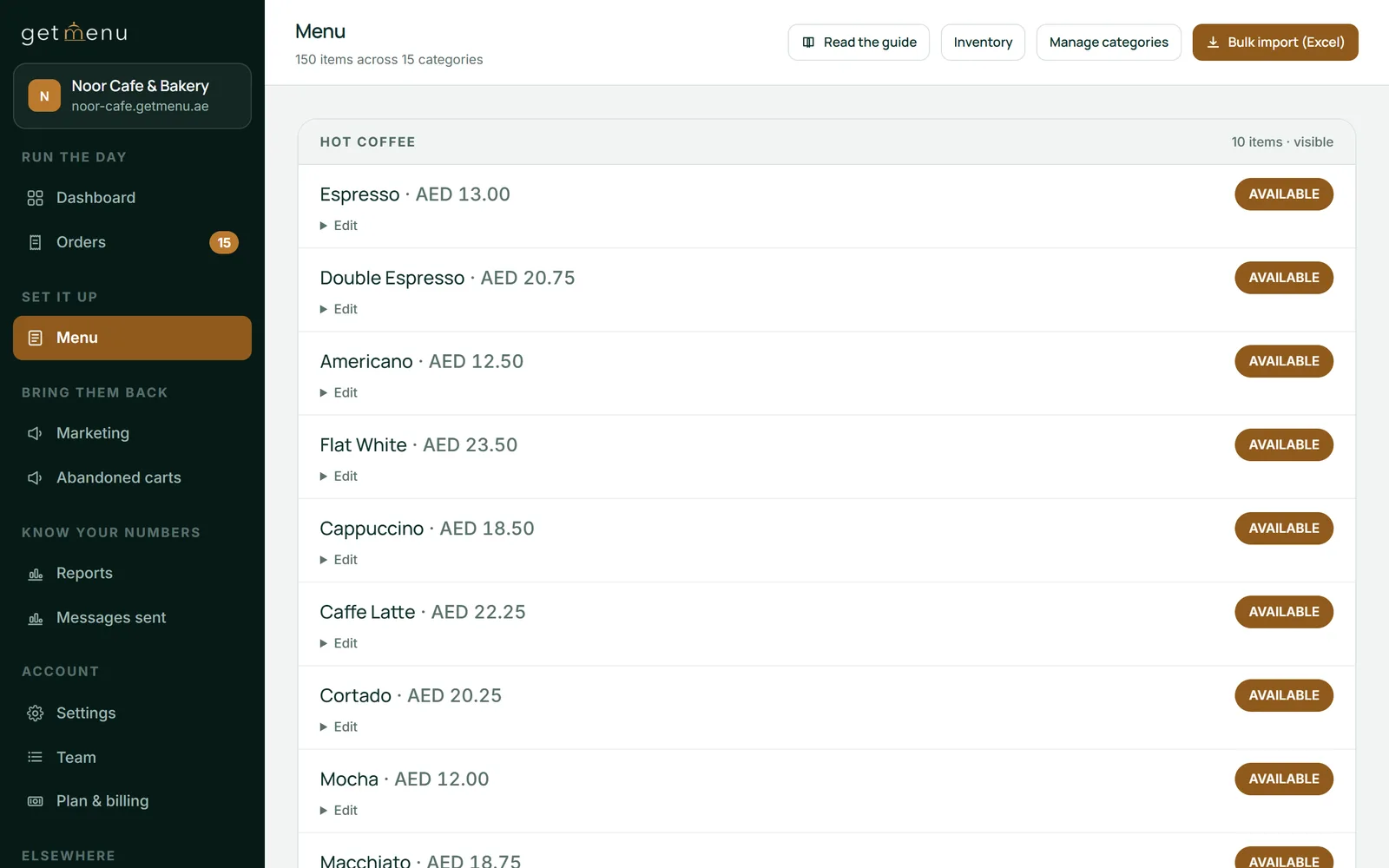
The menu list in the dashboard: 150 items across 15 categories, with Available badges and the Bulk import (Excel) button for the menu once it is in GetMenu's template
A two-week switching plan
Switch over two weeks and keep both systems running for the second one. The slowest step is the menu, and you can do it in the evenings while Sapaad still runs the counter.
Week one: start the 15-day GetMenu trial, which needs no card. Copy the menu into GetMenu's template, save it as an Excel file and upload it. Add photos to the twenty dishes that sell most. Import the building list and set the fee per building. Link your WhatsApp number and pick the two groups. Buy the yearly POS add-on, which has no trial of its own, then type in the tables and draw the floor plan. Pair one iPad as the counter and an old tablet as the kitchen screen.
Week two: run a quiet lunch service on GetMenu with Sapaad still open beside it. Place a test order on your own page and watch the three messages arrive. Ring up a counter sale and print its receipt and kitchen ticket. Give every staff member a PIN and let them ring up ten sales each. Put your page's link in your WhatsApp greeting, on your social pages and on a sign in the window. On Growth and Pro, print a QR card for each table too. When the new system has handled a full busy Friday on its own, cancel the old subscription with the exports already on your laptop.
Anzul Aqeel, the founder of GetMenu, sold POS software to small businesses for four years before he built one. "Switching is not the risky part. Staying because the exports look hard is."
What does not move when you switch POS systems
Three things do not move. Sales history stays in your exported reports and does not become GetMenu reports, so the new dashboard starts counting from your first order. Loyalty balances from the old system do not transfer. Tell regulars their stamps restart, and give them a welcome coupon on their first direct order (stamps are on the Pro plan; coupons on Growth and Pro). Any connection you ran inside Sapaad, such as a delivery app, has to be set up again. With GetMenu, delivery-app orders can land on the same board and kitchen screen once each app gives you partner access.
What you gain on the first day is a clear path for online orders. The customer's confirmation comes from your own WhatsApp number the moment the order is placed. Each order is priced from your own menu, and a double tap cannot send the same order twice. Online and WhatsApp orders show on the POS screen beside counter sales. Every order, from the counter, the web or WhatsApp, prints on one kitchen ticket at each station, and a customer's note prints on the ticket too.
There is one stock list for the counter and the online menu. Every sale lowers the count. When you mark a dish None left on the POS, it also comes off the other POS devices and the online menu. On the Pro plan, regulars grow into tiers with their own discounts, and the loyalty card in Apple Wallet or Google Wallet updates itself. On every monthly plan, the customer can download the PDF invoice without logging in. The plans are flat monthly prices with no commission, on the pricing page in your currency.
If you are switching POS systems mainly for the counter, read our comparison of Sapaad alternatives first. It compares kinds of software. This guide is about the move itself.
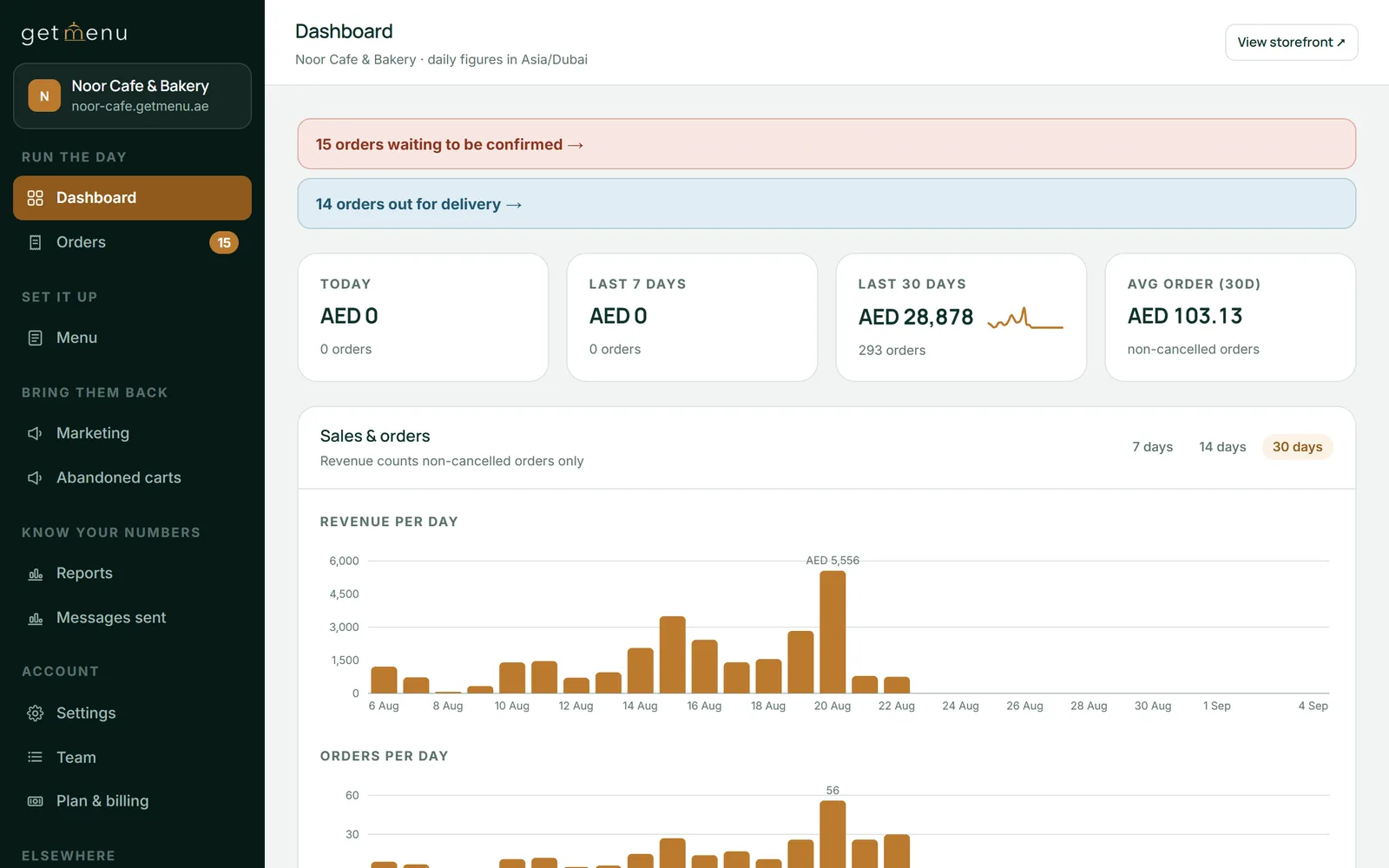
The Noor Cafe & Bakery dashboard: orders waiting to be confirmed, orders out for delivery, and sales for today, the last 7 days and the last 30 days
Frequently asked questions
How do I export my menu from Sapaad?
Sapaad's help centre says the menu downloads as a CSV file from Setup, then Inventory Setup, then Menu Setup, using the Upload Menu button and the option to download all items as a CSV file. Do it while your subscription is active. Open the file in a spreadsheet to check names, prices and extras, then copy it into GetMenu's import sheet and upload it.
How do I cancel my Sapaad account?
Sapaad's help centre says to go to Setup, then My Account, and press Cancel Account at the bottom of the page. Before you do, export the menu, save the reports your accountant will need, and export your customer list from the New Customers Report, because you may lose access once you cancel. Keep the files on your own computer.
How do I switch POS systems without losing data?
Export everything while you are still a paying customer: the menu with its extras, the sales reports by period, the customer list, your tax and service charge settings, and a list of every printer and drawer. Then rebuild the menu in the new system from the file and run both systems side by side for a week. Cancel the old one only after the new one has handled a full busy Friday on its own.
Is Sapaad the best POS for restaurants in the UAE?
It is a strong counter POS for restaurants with several branches and a dining room. It is a weaker fit for a small kitchen whose orders arrive by phone and WhatsApp and leave with riders. Its plans are priced per outlet for counters, kitchens and fleets, while that kitchen mainly needs its own ordering page and a way to reach its riders on WhatsApp.
What does Sapaad cost per outlet?
Sapaad's pricing page prices each plan, Essentials, Growth+ and Enterprise, per outlet per month, billed yearly or every two years, with a lower rate on the two-year plan. Check the page for today's figures in your country. Essentials includes online ordering, and Growth+ adds a rider app. GetMenu's plans are flat monthly prices listed on its pricing page in your currency.
Do Sapaad's printers and kitchen display work with GetMenu?
The printers usually do. Receipt and kitchen printers that use ESC/POS or Star commands print from the GetMenu POS over USB (on the LAN), network, Bluetooth and built-in. Sapaad's kitchen display is Sapaad's own software and stops with the subscription, but a tablet it ran on can become GetMenu's kitchen screen if it is an iPad on iOS 16 or later or an Android device on 5.0 or later.
The server goes, the menu moves as data, the counter runs on devices you choose, and online orders and riders join the same screen. What changes when a restaurant leaves on-premise Aloha, and how to do it without a lost service.
One kitchen, one menu. How categories, sort numbers, photos, options and stock live in one list that the counter, the QR tables and the ordering page all read, and where the dishes you want to sell should sit.